%20for%20Knowledge%20Base-2.png?width=200&height=43&name=Logo%20(white)%20for%20Knowledge%20Base-2.png)
In this article:
Understanding event ROI (Return On Investment)
Measuring the success of an event
Frequently Asked Questions (FAQs)
For information on getting started with Events and creating new Events, please see this article.
Understanding Event ROI (Return On Investment)?
There are a number of challenges that exist for professional services firm when attempting to measure the Return on investment for an event (how much you made vs how much you spent).
While the ideal outcome from an event would be receiving an immediate influx of new matters from attendees, this is very rarely the case. For professional services firm, the client buying process is often lengthy and convoluted.
These are some of the challenges that have hindered a firm's ability to assess the effectiveness or (ROI) for an event:
- New matters are unlikely to appear immediately following an event.
- The intended buyer of your services may not be the attendees themselves, but people they know (consider referrers) or other people from their company.
- Events can have a sole purpose of increasing engagement or awareness.
Measuring the success of an event
For the reasons mentioned above, the ability to measure the success or Return on Investment (ROI) for an event, runs deeper than simply assessing new matters.💡This does not though mean that measuring the success of an event is impossible or that it needs to remain purely subjective "do you think people got something from it?" or "do you think people enjoyed it?".
There are a range of ways that Client Sense can help measure the effectiveness of an event and if it was successful.
Comparing the following metrics before and after the event allow you to view if there has been an change in any of the following:
📨Emails: The amount of email communication back and forth between the firm and attendees.
📆Meetings: The number of meetings the firm has with the attendees.
👨👦👦Departments: The number of different practices areas known to the attendees.
🏢Offices: The number of different offices (firm locations) attendees are in contact with.
👫Contacts: The number of different people from the firm known to attendees.
💲Fees: The amount of revenue billed across the companies each attendee represents. Required fee integration with your financial system.
🎓Events: A count of the other firm events these people have attended.
📊Custom Activities: Any custom activities that the firm has set will appear and shown in the Engagement view.
Viewing post-event engagement
When an event has been completed, you are able to access the Event to assess the post-event engagement for each of the attendees.
If syncing the Event with an external system such as HubSpot, all Registered attendees will automatically be marked as Attended following the event.
See article on creating events here.
To view post Event engagement:
-
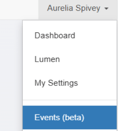
Open the Events Administration area by clicking Events (Beta) from the menu that appears when clicking your name at the top-right of the system.
-
Open the Event you would like to view by clicking the Name of the Event.
- Before viewing the Engagement, you will need to mark those that attended by clicking Set Attendance.
Note: This Attendance status is controlled from HubSpot if the Event is Synced with HubSpot.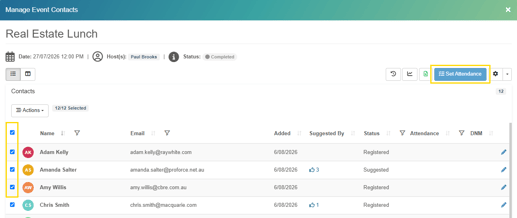
-
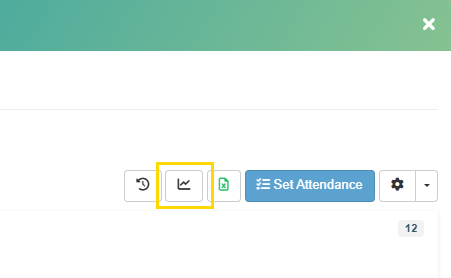
Click the Engagement button with the Chart Icon shown here:
Engagement Summary
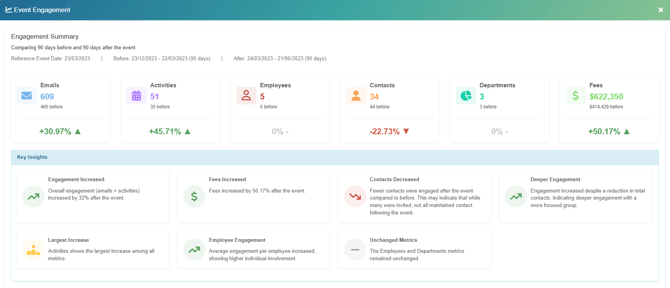
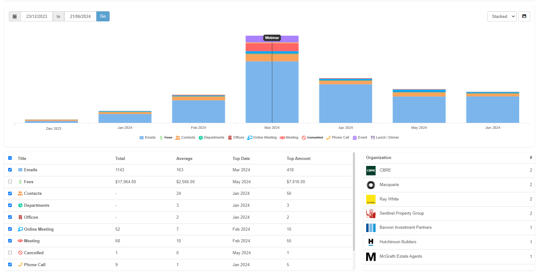
The Engagement Summary identifies key insights by identifying the metrics of most significant change.
Full engagement metrics
Scroll down further to view full metrics.
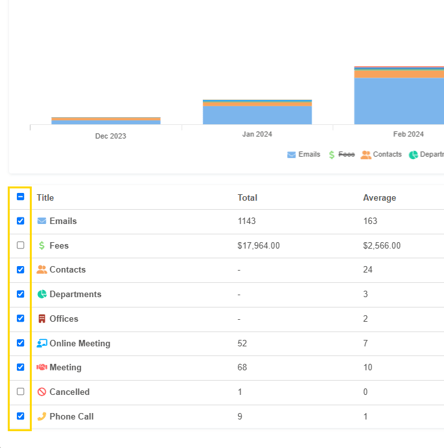
Select or deselect certain metrics
You can choose the metrics you would like shown as visible in the main engagement chart.
Note: you will only see the metrics which have occurred on or more times for any of these attendees in the timeframe set.
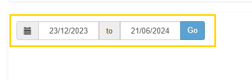
Timeframe
The default timeframe will show 90 days before and 90 days after the Event. You can though change this to reflect a different period.
Exporting as an image
Clicking the Image Icon will produce an image file of the chart which can be sent, uploaded elsewhere or embedded into a report of your choice.
Frequently Asked Questions (FAQs)
-
Do BD / Marketing or Events teams share this data with Partners, lawyers or accountants?
In some cases yes, though usually just with the hosts of event or those involved in event planning. -
Can this data help us understand which events makes sense to run or not?Yes, you can use this information to understand and demonstrate which of your events are more effective than others.
- Should we avoid running events in the future that how shown to have low engagement?
Not necessarily, the event may not be intended to drive engagement, it may be a 'thank you' style of event or simply need better follow up in the future to become effective. It may also be that the event had the wrong people in attendance this time around. Details on finding the right people here. - Can we really tell the partnership not to run certain events? Our job is to run events and it is their money.
No partner / director or business owner likes wasting their money. You demonstrating which events seem to show more value, will at a minimum help to prioritize the effort and spend that goes into events. It will present the opportunity to show what is working well and that you care about the outcome, which is to drive more revenue. - Can we look at the post engagement we have had with past events?
Yes, so long as you have the historical Client Sense data for the time period, by adding a prior event into the system you can view the engagement following a past event. - How long would it be after an event before we could expect to see a change in engagement?
Our experience has shown that this can typically take around 3 to 6 months. That said, there will always be exceptions and in reality, a client today might remember your firm fondly from an event 5 or 6 years ago that impacted their decision to use your firm.